Monday, February 21, 2011

Migrate user accounts from old Linux server Fedora to a new CentOS Linux server including mails and passwords.

Migrate user accounts from old Linux server(Fedora 13) to a new Cent OS Linux server including mails and passwords.

Why do I write this blogpost?
I'm using Sendmail + Squirrelmail + Dovecot since 2002 under Fedora Linux. But now i must switch my System to CentOS (orRHEL) 'cos my squirrel mail change password plugin was not work. Got a lot of trouble installing SuSE, Fedora 14 & Ubuntu. After testing those OS's I found that CentOS is the best solution for this.

I AM NOT RESPONSIBLE FOR ANY DAMAGES INCURRED DUE TO ACTIONS TAKEN BASED ON THIS DOCUMENT..........

What do i need to migrate?
1. Time
2. A lot of Coffee
3. Some Cigaretts (optional)
4. Take your wife/family out for a night or weekend

First login to our Mailserver(Fedora 13)

Create a directory
# mkdir /root/newusers.bak
# cp /etc/passwd /etc/shadow /etc/group /etc/gshadow /root/newusers.bak
# cd /root/newusers.bak
# mv passwd passwd.mig
# mv group group.mig
# mv shadow shadow.mig

(rarely used)
# cp /etc/gshadow /root/newusers.bak/
# mv gshadow gshadow.mig

Then delete entries from top (root) to userID 500 in every above 3 files. This bring our Useraccounts, passwords & their groups.

Use rsync, scp or usb pen or tape to copy /root/newusers.bak to a new Linux system.(CentOS)

# scp -r /root/newusers.bak/* user@172.16.1.254:/root/sandun/newusers/

Now login to our New mail server (CentOS)

First, make a backup of current users and passwords:
# mkdir /root/users.bak
# cp /etc/passwd /etc/shadow /etc/group /etc/gshadow /root/users.bak

Now restore passwd and other files in /etc/
# cd /root/sandun/newusers/
# cat passwd.mig >> /etc/passwd
# cat group.mig >> /etc/group
# cat shadow.mig >> /etc/shadow

Now copy and extract /home/ and /var/mail/ to new Server's /home/ & /var/mail/

<<<< Change the user ID to 500 if you migrate Suze Linux
vi /etc/login.pref
UID_MIN 500 >>>>

# rsync -ave ssh /home/ root@172.16.1.254:/home/
# rsync -ave ssh /var/mail/ root@172.16.1.254:/var/mail/

Single user(ex:- sandun)
# rsync -ave ssh /home/sandun root@172.16.1.254:/home/
# rsync -ave ssh /var/mail/sandun root@172.16.1.254:/var/mail/

Voila, now login to the new system using old server username and password.....

+++++++++++++++++++++++++++++++++
(we can filter out system account using 'awk')
# awk -v LIMIT=$UGIDLIMIT -F: '($3>=LIMIT) && ($3!=65534)' /etc/passwd > /root/move/passwd.mig

source: http://www.cyberciti.biz/faq/howto-move-migrate-user-accounts-old-to-new-server/

Thursday, July 15, 2010

Ada Wage Dawasaka ‘ANTIGONE’ by Priyankara Rathnayaka

Award winning actor and playwright Priyankara Rathnayaka's latest play Ada Wage Dawasaka ‘ANTIGONE' based on veteran Greek playwright Sophocles will go on the boards at the Lionel Wendt Theatre on July 16, 17 at 7.00 p.m. A DAY LIKE TODAY 'ANTIGONE' is presented by Academic Players of Drama and Theatre & Image Arts Unit, University of Kalaniya and directed by Priyankara Rathnayaka. source: http://srilankan-stars.blogspot.com

antigone
This play was translated into Sinhala by well known writer & poet Ariyawansa Ranaweera. Music is composed by Pramith Dahanayaka, Choreography created by Harshani Rathnayaka & Priyankara Rathnayaka.


The cast includes Wishvajith Gunasekara, Prasadini Athapathu, Priyantha Sirikumara, Thumindu Dodantenna, Kaushalya Mendis, Saman Malalasekara ,Vijitha Bandara, Thusitha laknath Gayan Randeera, Harshika Rathnayaka, Samadhi Laksiri and University Undergraduates. "ANTIGONE" is sponsored by Facilitating Local Initiatives for Conflict Transformation (FLICT) Organization.

'Antigone' Rehearsals....

antigone


ada wage dawasaka antigone


This copyrighted materials own by Priyankara Rathnayaka. Distribution, editing, blogging, print and display without owners permission is prohibited.

Thursday, May 20, 2010

Facebook on Your Mobile Phone Free of charge

0.facebook.com is a new mobile site that includes all of the key features of Facebook but is optimized for speed. It initially is available through more than 50 mobile operators in 45 countries and territories with zero data charges. Mobitel is now offering you free mobile browsing on the new 0.facebook.com site in Sri Lanka.


Using 0.facebook.com is completely free. People will only pay for data charges when they view photos or when they leave 0.facebook.com to browse other mobile sites. When they click to view a photo or browse another mobile site a notification page will appear to confirm that they will be charged if they want to leave 0.facebook.com (more...)

Join Mobitel FB, Click Here...

Wednesday, October 07, 2009

Install Ubuntu Linux on Windows Vista using Sun Virtual Box ..:: වින්ඩෝස් විස්ටා මත උබුන්ටු ::..

How to use both Windows and Ubuntu at the same time (not with dual boot)? ඉස්සර ගොඩක් කස්ටිය පාවිච්චි කලේ වින්ඩෝස් - ලිනක්ස් ද්විත්ව ස්ථාපන (dual boot) යනෙ. දැන් ඉතින් එහෙම ඕනා නෑ, Virtualization වලට පිංසිද්ද වෙන්න. screen-shot එක උඩ ඔබලා බලන්න.


With virtual environment you can create and run several operating systems("virtual machines") such as Linux, Windows, FreeBSD, Novell etc. under a host operating system. This has the benefit that you can run multiple operating systems on the same Machine.(not with dual boot)

ඒත් ඉතින් මේවා කරන්න ඔයාගේ මැෂිම හොද වෙන්න ඕනා. අඩුම තරමේ RAM එක 1GB වත් තියෙන්න ඕනා. 512KB වලිනුත් පුලුවන්. ඒත් ඉතින් පට්ට slow. Core 2 Duo තියෙනවනම් හොදයි, ඒත් PIVතිබ්බත් කමක් නෑ.

VMware , VirtualBox , and QEMU are the most popular virtualization environments today. My choice is VirtualBox, is the lack of direct access to the hardware. VMware is not open source software. But VMware Server2 interface is web based and can be accessed by loclly or remotely going to https://:8333 or http://:8222. QEMU is fully free, but noticeably slower than VMware & VirtualBox.

ඒත් ඉතින් vmware කචල් ගොඩායි.
මල චාටර්... මගේ හොද fit එකක් තමයි මේක(sun virtual box) මට කියලා දුන්නේ. මම අද කියන්න යන්නේ Sun VirtualBox පාවිච්චි කරලා windows vista මත ubuntu ස්ථාපනය කරන ආකාරයයි.

A. ඉස්සෙල්ලම http://www.ubuntu.com/GetUbuntu/download එකට ගිහිල්ලා Ubuntu 9.04 Desktop එක ඩවුන්ලෝඩ් කරගන්න. ( ubuntu 9.10 ලගදීම එනවා...)

B. ඊට පස්සේ http://www.virtualbox.org/wiki/Downloads එකට ගිහිල්ලා VirtualBox 3.0.8 for Windows hosts එක ඩවුන්ලෝඩ් කරගන්න. (මේක vmware වගේමයි,
ඒත් opensource)

දැන් ඉතින් දෙයියනේ කියලා වින්ඩෝස් වලට ගිහිල්ලා VirtualBox154Winx86.exe එක ස්ථාපනය කරගන්න.(ඩවුන්ලෝඩ් වෙච්ච ubuntu-9.04-desktop-i386.iso එක CD එකකට write කර ගන්න ඕනා නෑ. ඒක windows වලම තියා ගන්න.) ඊට පස්සේ ස්ථාපනය වූ virtualbox එක open කරගන්න.

1. දැන් ඉතින්
මෙනුවෙ Machine --> New ක්ලික් කරන්න.


2. Next කරලා Name එකට කැමති නමක් දෙන්න, OS එක Linux, version එක උබුන්ටු කරලා Next කරන්න.
3. Base Memory size එක වෙනස් කරන්න.(තියෙන ගාන උනත් කමක් නෑ)
4. ඊට පස්සේ Create new hard disk එක සිලෙක්ට් කරලා Next කරන්න.
5. දැන් Dynamically expanding storage එක සිලෙක්ට් කරලා Next කරන්න.( ඔයාගේ hard disk එකේ ඉඩ නැත්නම් Fixed-size storage එක සිලෙක්ට් කරන්න)
6. ඊට පස්සේ Location එකට ඔයා කැමති තැනක් හා Size එකක් දෙන්න. Next කරන්න.
7. දැන් Finish කරන්න.


දැන් ඉතින් උබුන්ටු මෙහෙයුම් පද්ධතිය ස්ථාපනය කරමු.

1. දැන් Settings ක්ලික් කරන්න.
2. ඊට පස්සේ CD/DVD-ROM එකට ගිහිල්ලා Mount CD/DVD Drive එක සිලෙක්ට් කරන්න.
දැන් ISO Image File එක සිලෙක්ට් කරලා, Aහි ඩවුන්ලෝඩ් වෙච්ච ubuntu-9.04-desktop-i386.iso
එකේ Location එක දෙන්න.( උබුන්ටු CD එකක් තියෙනවානම් Host CD/DVD Drive එක සිලෙක්ට්
කරන්න)
3. දැන් OK කරන්න.
4. දැන් Start කරන්න.


හොදට මතක තියා ගන්න, virtual box එකෙන් එලියට එන්න Ctrl Key එක ක්ල්ක් කරන්න. Ubuntu ස්ථාපනය කරගෙන යන්න. දැන් ඉතින් දෙයියනේ කියලා Sun Virtual Box මැෂිම රීස්ටාට් කරන්න.(close & open)

Settings --> CD/DVD-ROM එකට ගිහිල්ලා Mount CD/DVD Drive එක un සිලෙක්ට් කරන්න. දැන්Start කරන්න.

දැන් ඉතින් ගොඩම තමා. ඒත් තවම ගොඩ නෑ.තව drivers ස්ථාපනය කරන්න ඕනා. full screen එන්නේ නෑ. ඒකට කරන්න ඕනා පොඩි දෙයක්. යන්න Devices -> Install Guest Additions එකට. මුකුත් වෙන්නේ නෑ නේද? බය වෙන්න දෙයක් නෑ. බලන්න CD එකක් mount වුනාද කියලා. (more info pl go to Help --> Contents, in Sun Virtual Box)

ඔක්කොටම කලින් කරන්න ඕන root වලට මුර පදයක් දෙන එක. ටර්මිනල්(Applications --> Accessories --> Terminal) එකක් අරගෙන මේ විධානය දෙන්න. root ලෙස වැඩ කරද්දී පරිස්සමින් වැඩ කරන්න.

$sudo passwd root

කැමති මුර පදයක් දීලා ඉන්පසු /media/ ගොනුවට යන්න.ඊට පස්සේ මේ විධාන දෙන්න.

#cd /media
#ls
#cd cdrom
#sh ./VBoxLinuxAdditions-x86.run


දැන් Sun Virtual Box මැෂිම රීස්ටාට් කරන්න.

Full Screen ආවේ නැත්නම් මෙන්න මෙහෙම කරන්න. ටර්මිනල් එකක් අරගෙන මේ විධාන දෙන්න. xorg.conf එක මෙන්න මේ විදියට වෙනස් කරන්න. මගේ නම් තියෙන්නේ Display resolution 1366x768.

#cd /etc/X11/
#vim xorg.conf

Section "Screen"
Identifier "Default Screen"
Device "VirtualBox graphics card"
Monitor "Generic Monitor"
DefaultDepth 24
SubSection "Display"
Depth 24
Modes "1366x768" "1280x768" "800x600"
EndSubSection
EndSection


දැන් Sun Virtual Box මැෂිම රීස්ටාට් කරන්න.ඔන්න දැන් නම් ආවේ නැත්නම් දමලා ගහලා පොඩි fun එකක් දාන්න යන්න. ඊට පස්සේ ඇවිත් ආයෙම කරලා බලන්න. මොනවා හරි ඕනානම් කියන්න.

Monday, September 21, 2009

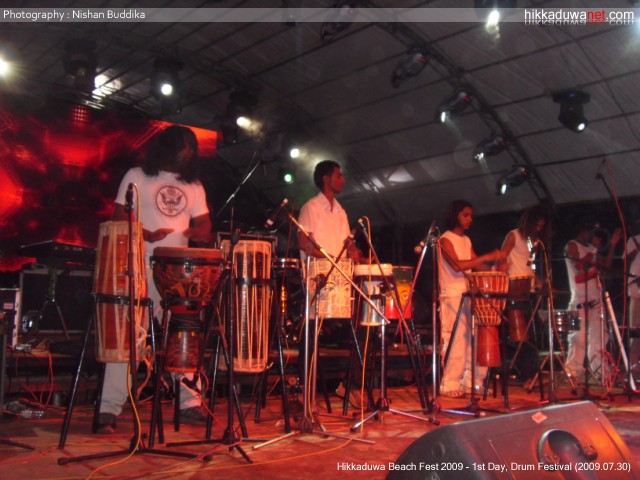
New Pictures of Hikka Fest 2009

I had already mentioned in a blog article මොකක්ද මේ Hikka Fest? I've never been to Hikka but I wish to go there in next year. I got this URL from my friend, http://www.hikkaduwanet.com. Fortunately they enable IndexIgnore in Apache. I thought this would be a great pictures to share with you.

Day 1 - Drum Festival 30th July, 2009


more photos of Day 1 --> http://www.hikkaduwanet.com/music_party/hikka_fest09/gallery/first_night/portfolio/foto1/

Day 2 - Beach Rave 31st July , 2009


more photos of Day 2 --> http://www.hikkaduwanet.com/music_party/hikka_fest09/gallery/second_night/portfolio/foto1/

Themed Parties 1st to 2nd August 2009


more photos of Themed Parties --> http://www.hikkaduwanet.com/music_party/hikka_fest09/gallery/themed_parties/portfolio/foto1/

Sports and Events 30th July to 2nd August 2009


more photos of Sports N Events --> http://www.hikkaduwanet.com/music_party/hikka_fest09/gallery/sports_events/portfolio/foto1/

source http://www.hikkaduwanet.com

Friday, September 18, 2009

Pick your Facebook Username and Log In

A couple of weeks ago Facebook finally announced that they would allow users to pick out usernames. This helps to find and connect with each other very easily. Over 50 million users have them.

Today they introduced to log in to their Facebook accounts using their username rather than their email to log on to Facebook.com . Usernames are just easier to remember. It’s a common practice for many websites to allow users to log in with their username. It allows you to skip typing the extra characters.

If you don't have a Facebook username yet, you can choose one here

or

Go to "Settings" at the top-right of the Facebook page and then click on "Account Settings." The second option from the top is "Username." Press "Change" to enter in your new username and then click "Confirm" when you're ready to set it.

"Choose your new username carefully. You can only change your username once."

Tuesday, September 08, 2009

Mobitel M3 Apps වැදගත් ප්‍රෝඩාව...

"Now 7GB වැදගත් email for every Mobitel Customer " මට නම් මේකේ වැදගත් කමක් පේන්න නෑ.

මේ Google Apps ඔක්කොම FREE හම්බවෙද්දී ඇයි අපි (100/= joining free) + (50/=+ VAT monthly) ගෙවන්නේ??? තියෙන එකම වාසිය email account එකේ gmail.com කියන domain name එක වෙනස් වන එක විතරයි. Google Mail, Google Calender, Google Docs, Google Sites සහ Google Talks නිකං හම්බ වෙද්දී, ඇයි අපි සල්ලි දීලා මේවා ගන්න ඕන??? Dialog, TIGO කස්ටිය මේකට මොනවා කරයිද දන්නේ නෑ !!!


I had already mentioned in a blog article http://sandunfernando.blogspot.com/2009/07/sms-alerts-from-google-calender.html, in July 2009, that we can set SMS alerts from Google Calender. Month later, Sri Lanka Telecom Mobitel announced Mobitel M3 Apps with Google on August 19, 2009.

Google website says,

Google HelpGoogle Calendar HelpNotificationsSMSCost of SMS notifications

Google Calendar is a free product and Google doesn't charge you to receive notifications. Please keep in mind that if you're in the US or Canada, your mobile service provider's standard rate for receiving text messages may apply.

අපි ඉන්නේ ලංකාවේ.......

Friday, September 04, 2009

Twitter Clone Yahoo Meme Microblogging service from Yahoo!

Yahoo! announced thier Microblogging service, Twitter clone as Yahoo Meme. Like Twitter and Tumblr you can post, repost, share contents and search other people’s public accounts and follow them with Yahoo Meme. On the other hand Yahoo Meme, allows you to post different type of content like text, pictures, video and even music.

Login to http://meme.yahoo.com and create an acoount or leave your email in the text box and click "i want in!". After receiving confirmation you have an empty micro blog.


To know more about Yahoo Meme, visit ReadWriteWeb - Hands On With Yahoo's Twitter 'Clone' .

Thursday, August 27, 2009

මොකක්ද මේ Hikka Fest

Hikka Fest එක නම් ඉවරයි, ඒත් කස්ට්ය තාම මේ ගැන කතා කරනවා, emails හෝ ගාල එනවා. Hikkaduwa Beach Festival කියන්නේ ලංකාවේ පවත්වන එකම එක බීච් සැණකෙලිය. මේ පාර නම් ගිය පාරට වඩා කස්ටිය අඩුයි කියලා ආරංචිය. Numbers of participants in this year approximately 8000 which began on Thursday July 30, 2009 and lasted through the weekend. Hikka included many thrilling and entertaining games and events for everyone. Tickets are priced at Rs. 2500 for a seasonal pass and Rs. 3500 for a VIP pass!!!

Hikka Videos Clip 1 Clip2 Clip3


Hikka Fest 2008


photo courtesy by hikkafest.com