Monday, April 02, 2012

University of Kelaniya won Sri Lanka FLUX 2012

Top student entrepreneurs from University of Kelaniya and University of Colombo attended an intensely competitive final of Sri Lanka Flux 2012 – a business challenge created and run by University of Plymouth. Flux is the largest inter-university enterprise competition in UK. Flux bridges the gap between education and the workplace. This year’s event was sponsored by British Council and the University of Plymouth. It was held at the Pegasus Reef Hotel on March 31st and April 01, 2012.

Visit Sri Lanka FLUX 2012 @ Plymouth University, click here...


As part of the fast-paced, two-day competition, teams of five students were challenged to create a new business plan title 'Bright future in Tourism'. They spent the day developing their enterprise ideas and plan for a community based business to this title. Over 20 business experts, from companies of other large and small organisations were on hand to guide the students.

A team of staff from the Plymouth University Business School, Dr Dulekha Kasturiratne, Dr Jonathan Lean and Marc Lintern, Head of Employability, worked with colleagues from both Kelaniya and Colombo Universities.

During the competition finals, the team had just ten minutes to pitch their strategy to the business experts – who went from consultants in the day to ‘dragons’ in the evening – before facing rigorous questioning and receiving feedback.

After the preliminary heats, two teams from the University of  Kelaniya and the one team from the University of Colombo were chosen to compete in a final head-to-head challenge.

With only 15 minutes to prepare, the teams then faced a tense press conference-style grilling from four of the toughest business experts.  After all the votes were counted the University of Kelaniya came out as Sri Lanka Flux 2012 champions and 2nd runner up team. I am proud to be a member of 2nd runner up team of this FLUX event.


Sri Lanka Flux 2012 Top 3 Groups:

1. Biz Pro(Winners, University of Kelaniya)
  Nuwan Bandara, Chathurani Ranwalage , Sumudu, Shakkya, Tharsan Sanjeewa Rathnayake

2. Flying Bees(1st runner up, University of Colombo)

3. Spirit (2nd runner up, University of Kelaniya)
  Kumudu Rajapakshe, Roshan Kurukulasuriya, Prasanna Wijesinghe, Suneth Ananda and Sandun Fernando (It's Me....)

Wednesday, January 04, 2012

Answers for examine data used by a Real Estate investment advisor


Research Methodology

The questions give a careful statement of what is required and information about the presentation of your answers. Follow this carefully! Marks may be deducted for poor presentation.In particular, you are specifically required to state answers in bullet point. 

In this assignment you will examine data used by a Real Estate investment advisor. She wants you to answer some specific questions put by clients about houses prices in the neighbourhood encompassed by 4 suburbs around Colombo City. The data is contained in the file ‘Real_Estate.xls’ and contains the following columns (variables):


Variable Name Description
ID House Identity number
Price Selling Price of the house (in 000’s)
Bedrooms Number of bedrooms
Size House Size (m2)
Pool 0=House without a Pool
1=House with a Pool
Distance Distance from city centre (km)
Suburb Suburb number 
Garage 0=House without a Garage
1=House with a Garage

1. Random Sample:Before you begin your analysis you are required to take a random sample of size 100 from the 170 cases in the file. Use the file Random Sample Generator.xls to do this.Answers to the questions below are to be based on your sample of 100 cases.Make sure to keep a safe copy of the sample you use since you cannot use RandomSample Generator to reproduce it. Provide a printout of the data in your sample. The data is to be ordered by ID.

2. Introduction: Provide a one paragraph introduction to your small report. You simply need to state what the main purpose of the report is and which variables will be analysed. 

3. Summary table: 
i) Prepare a summary table that shows the mean, standard deviation and 95% confidence interval for the mean of the following variables: 
Selling Price, Number of bedrooms, Size of house, Distance from city centre 

ii) Use some of the information in (i) to describe a typical house in these suburbs.

iii) Prepare a summary table that shows the mean and standard deviation ofPrice for houses in the 4Suburbsaccording (subject) to the variableBedrooms. Think carefully about the layout of the rows and columns of your table. As well as means and standard deviations you should also include the number of houses in each group. So each cell in your final table should contain the mean, thestandard deviation and n, the number of houses in that group. 

iv) Comment, in bullet point form, on the Price of any combinations for Suburb and Bedroomsvariables (i.e. cells in the table).


4. A local real estate firm has told a client that the average Price of a house in Suburb 2 is valued at Rs 42 million.  You have been asked to evaluate this claim. Use a One Sample forthe Mean to evaluate the claim that the average price is Rs 42mln. In doing so clearly state the following:
any necessary assumptions required to do the test;
both null and alternative hypotheses;
an appropriate conclusion.


5. Price and Size of the house by Suburbs:A client wants information on size of the house as it relates to price.
I. Produce a scatter plot of Price vsSize (Sizeshould be on the horizontal axis). 
II. In bullet point form state what this tells you about the relationship between Size and Prices.
III. Fit a linear trend line on the scatterplot, showing the equation and the value of R2 and explain what it tells you about the way Prices change withincreasingSize.
IV. Produce a stratified scatter plot of Price against Size, split on Suburbs, and examine the relationship for the five Suburbs. Respond to the following question, giving evidence for your conclusions: 
V. In what ways does the relationship between Prices and Size vary as we move from one Suburb to another? 


6) Using information from your analyses write a short concluding paragraph about houses prices and sizes for different suburbs. 


Answers coming soon...  After January 7, 2012....... 


Monday, June 06, 2011

Swarnamali Stupa Wandanawa on June 4, 5 2011

I was so delightful to attend the 'Swarnamali Stupa Wandanawa' held at the Ruwanwelisaya on June 4th & 5th 2011, to commemorate 2600 Sambuddha Jayanthi and 60th Annivesary of Sri Kalyani Yogashrama . This was organized by the Sri Kalyani Yogashrama Sanstha with the guidance of Most Venerable Nauyane Ariyadhamma Maha Thero. Huge crowd gathered.

swarnamali stupa ruwanwelisaya sri lanka


To commemorate the 2500th Buddha Jayanthi Ven. Kadawedduwe Sri Jinawansa Thera founded the Kalyana Yogashrama Sanstha on 18th June 1951. Nimalawa Aranya Senasanaya in Kirinda was selected as the first aranya of a number of aranya senasana that was to be named Kalyana Yogashrama Sansthawa. With the passage of time the fame of Kalyana Yogashrama grew. People in many walks of life flowed in to the Aranya in search of the authentic way of meditation. But setting up the Kalyana Yogashrama Sanstha was no easy task. Although most ley persons were attracted to Ven. Kadawedduwe Sri Jinawansa Theras extremely eloquent sermons, there were people, the ley and monks alike who resented and envied his success. But thanks to his conviction the Kalyana Yogashrama Sanstha now has over 150 Aranya with over 1500 monks.(2007 figures) All the monks in all the Aranya belonging to the Yogashrama Sanstha, work according to the same time table. They all worship three times a day. They start the day at four a.m. and meditate for an hour. Unlike in temples of today the main focus of an Aranya is meditation.

Sri Kalyani Yogashrama is an independent part of the Sri Lankan Ramañña Nikāya Buddhist ordination line, with their headquarters in Galduva. They are keeping a strict standard of Vinaya (commentarial interpretation), recognised as the strictest standard of any major organisation in Sri Lanka. It is the largest forest sect of the Sri Lankan Sangha. Their monks are easily recognised by the palm-leaf umbrella they are using and by the habit of wearing the Sanghati (double robe) whenever they walk outside the monastery boundaries. Remarkably for Sri Lanka, all castes are accepted for ordination. Foreign monks, who wish to become resident at one of their monasteries, are usually expected to undergo the so called "Dalhi-Kamma" at Galduva, a short ceremony meant to reconfirm the validity of their original Upasampada according to Galduva standard. After that they are accepted according to their normal seniority. Source:http://en.wikipedia.org/wiki/Sri_Kalyani_Yogasrama_Samstha


websites:

http://ariyainfo.org


Monday, February 21, 2011

Migrate user accounts from old Linux server Fedora to a new CentOS Linux server including mails and passwords.

Migrate user accounts from old Linux server(Fedora 13) to a new Cent OS Linux server including mails and passwords.

Why do I write this blogpost?
I'm using Sendmail + Squirrelmail + Dovecot since 2002 under Fedora Linux. But now i must switch my System to CentOS (orRHEL) 'cos my squirrel mail change password plugin was not work. Got a lot of trouble installing SuSE, Fedora 14 & Ubuntu. After testing those OS's I found that CentOS is the best solution for this.

I AM NOT RESPONSIBLE FOR ANY DAMAGES INCURRED DUE TO ACTIONS TAKEN BASED ON THIS DOCUMENT..........

What do i need to migrate?
1. Time
2. A lot of Coffee
3. Some Cigaretts (optional)
4. Take your wife/family out for a night or weekend

First login to our Mailserver(Fedora 13)

Create a directory
# mkdir /root/newusers.bak
# cp /etc/passwd /etc/shadow /etc/group /etc/gshadow /root/newusers.bak
# cd /root/newusers.bak
# mv passwd passwd.mig
# mv group group.mig
# mv shadow shadow.mig

(rarely used)
# cp /etc/gshadow /root/newusers.bak/
# mv gshadow gshadow.mig

Then delete entries from top (root) to userID 500 in every above 3 files. This bring our Useraccounts, passwords & their groups.

Use rsync, scp or usb pen or tape to copy /root/newusers.bak to a new Linux system.(CentOS)

# scp -r /root/newusers.bak/* user@172.16.1.254:/root/sandun/newusers/

Now login to our New mail server (CentOS)

First, make a backup of current users and passwords:
# mkdir /root/users.bak
# cp /etc/passwd /etc/shadow /etc/group /etc/gshadow /root/users.bak

Now restore passwd and other files in /etc/
# cd /root/sandun/newusers/
# cat passwd.mig >> /etc/passwd
# cat group.mig >> /etc/group
# cat shadow.mig >> /etc/shadow

Now copy and extract /home/ and /var/mail/ to new Server's /home/ & /var/mail/

<<<< Change the user ID to 500 if you migrate Suze Linux
vi /etc/login.pref
UID_MIN 500 >>>>

# rsync -ave ssh /home/ root@172.16.1.254:/home/
# rsync -ave ssh /var/mail/ root@172.16.1.254:/var/mail/

Single user(ex:- sandun)
# rsync -ave ssh /home/sandun root@172.16.1.254:/home/
# rsync -ave ssh /var/mail/sandun root@172.16.1.254:/var/mail/

Voila, now login to the new system using old server username and password.....

+++++++++++++++++++++++++++++++++
(we can filter out system account using 'awk')
# awk -v LIMIT=$UGIDLIMIT -F: '($3>=LIMIT) && ($3!=65534)' /etc/passwd > /root/move/passwd.mig

source: http://www.cyberciti.biz/faq/howto-move-migrate-user-accounts-old-to-new-server/

Thursday, July 15, 2010

Ada Wage Dawasaka ‘ANTIGONE’ by Priyankara Rathnayaka

Award winning actor and playwright Priyankara Rathnayaka's latest play Ada Wage Dawasaka ‘ANTIGONE' based on veteran Greek playwright Sophocles will go on the boards at the Lionel Wendt Theatre on July 16, 17 at 7.00 p.m. A DAY LIKE TODAY 'ANTIGONE' is presented by Academic Players of Drama and Theatre & Image Arts Unit, University of Kalaniya and directed by Priyankara Rathnayaka. source: http://srilankan-stars.blogspot.com

antigone
This play was translated into Sinhala by well known writer & poet Ariyawansa Ranaweera. Music is composed by Pramith Dahanayaka, Choreography created by Harshani Rathnayaka & Priyankara Rathnayaka.


The cast includes Wishvajith Gunasekara, Prasadini Athapathu, Priyantha Sirikumara, Thumindu Dodantenna, Kaushalya Mendis, Saman Malalasekara ,Vijitha Bandara, Thusitha laknath Gayan Randeera, Harshika Rathnayaka, Samadhi Laksiri and University Undergraduates. "ANTIGONE" is sponsored by Facilitating Local Initiatives for Conflict Transformation (FLICT) Organization.

'Antigone' Rehearsals....

antigone


ada wage dawasaka antigone


This copyrighted materials own by Priyankara Rathnayaka. Distribution, editing, blogging, print and display without owners permission is prohibited.

Thursday, May 20, 2010

Facebook on Your Mobile Phone Free of charge

0.facebook.com is a new mobile site that includes all of the key features of Facebook but is optimized for speed. It initially is available through more than 50 mobile operators in 45 countries and territories with zero data charges. Mobitel is now offering you free mobile browsing on the new 0.facebook.com site in Sri Lanka.


Using 0.facebook.com is completely free. People will only pay for data charges when they view photos or when they leave 0.facebook.com to browse other mobile sites. When they click to view a photo or browse another mobile site a notification page will appear to confirm that they will be charged if they want to leave 0.facebook.com (more...)

Join Mobitel FB, Click Here...

Wednesday, October 07, 2009

Install Ubuntu Linux on Windows Vista using Sun Virtual Box ..:: වින්ඩෝස් විස්ටා මත උබුන්ටු ::..

How to use both Windows and Ubuntu at the same time (not with dual boot)? ඉස්සර ගොඩක් කස්ටිය පාවිච්චි කලේ වින්ඩෝස් - ලිනක්ස් ද්විත්ව ස්ථාපන (dual boot) යනෙ. දැන් ඉතින් එහෙම ඕනා නෑ, Virtualization වලට පිංසිද්ද වෙන්න. screen-shot එක උඩ ඔබලා බලන්න.


With virtual environment you can create and run several operating systems("virtual machines") such as Linux, Windows, FreeBSD, Novell etc. under a host operating system. This has the benefit that you can run multiple operating systems on the same Machine.(not with dual boot)

ඒත් ඉතින් මේවා කරන්න ඔයාගේ මැෂිම හොද වෙන්න ඕනා. අඩුම තරමේ RAM එක 1GB වත් තියෙන්න ඕනා. 512KB වලිනුත් පුලුවන්. ඒත් ඉතින් පට්ට slow. Core 2 Duo තියෙනවනම් හොදයි, ඒත් PIVතිබ්බත් කමක් නෑ.

VMware , VirtualBox , and QEMU are the most popular virtualization environments today. My choice is VirtualBox, is the lack of direct access to the hardware. VMware is not open source software. But VMware Server2 interface is web based and can be accessed by loclly or remotely going to https://:8333 or http://:8222. QEMU is fully free, but noticeably slower than VMware & VirtualBox.

ඒත් ඉතින් vmware කචල් ගොඩායි.
මල චාටර්... මගේ හොද fit එකක් තමයි මේක(sun virtual box) මට කියලා දුන්නේ. මම අද කියන්න යන්නේ Sun VirtualBox පාවිච්චි කරලා windows vista මත ubuntu ස්ථාපනය කරන ආකාරයයි.

A. ඉස්සෙල්ලම http://www.ubuntu.com/GetUbuntu/download එකට ගිහිල්ලා Ubuntu 9.04 Desktop එක ඩවුන්ලෝඩ් කරගන්න. ( ubuntu 9.10 ලගදීම එනවා...)

B. ඊට පස්සේ http://www.virtualbox.org/wiki/Downloads එකට ගිහිල්ලා VirtualBox 3.0.8 for Windows hosts එක ඩවුන්ලෝඩ් කරගන්න. (මේක vmware වගේමයි,
ඒත් opensource)

දැන් ඉතින් දෙයියනේ කියලා වින්ඩෝස් වලට ගිහිල්ලා VirtualBox154Winx86.exe එක ස්ථාපනය කරගන්න.(ඩවුන්ලෝඩ් වෙච්ච ubuntu-9.04-desktop-i386.iso එක CD එකකට write කර ගන්න ඕනා නෑ. ඒක windows වලම තියා ගන්න.) ඊට පස්සේ ස්ථාපනය වූ virtualbox එක open කරගන්න.

1. දැන් ඉතින්
මෙනුවෙ Machine --> New ක්ලික් කරන්න.


2. Next කරලා Name එකට කැමති නමක් දෙන්න, OS එක Linux, version එක උබුන්ටු කරලා Next කරන්න.
3. Base Memory size එක වෙනස් කරන්න.(තියෙන ගාන උනත් කමක් නෑ)
4. ඊට පස්සේ Create new hard disk එක සිලෙක්ට් කරලා Next කරන්න.
5. දැන් Dynamically expanding storage එක සිලෙක්ට් කරලා Next කරන්න.( ඔයාගේ hard disk එකේ ඉඩ නැත්නම් Fixed-size storage එක සිලෙක්ට් කරන්න)
6. ඊට පස්සේ Location එකට ඔයා කැමති තැනක් හා Size එකක් දෙන්න. Next කරන්න.
7. දැන් Finish කරන්න.


දැන් ඉතින් උබුන්ටු මෙහෙයුම් පද්ධතිය ස්ථාපනය කරමු.

1. දැන් Settings ක්ලික් කරන්න.
2. ඊට පස්සේ CD/DVD-ROM එකට ගිහිල්ලා Mount CD/DVD Drive එක සිලෙක්ට් කරන්න.
දැන් ISO Image File එක සිලෙක්ට් කරලා, Aහි ඩවුන්ලෝඩ් වෙච්ච ubuntu-9.04-desktop-i386.iso
එකේ Location එක දෙන්න.( උබුන්ටු CD එකක් තියෙනවානම් Host CD/DVD Drive එක සිලෙක්ට්
කරන්න)
3. දැන් OK කරන්න.
4. දැන් Start කරන්න.


හොදට මතක තියා ගන්න, virtual box එකෙන් එලියට එන්න Ctrl Key එක ක්ල්ක් කරන්න. Ubuntu ස්ථාපනය කරගෙන යන්න. දැන් ඉතින් දෙයියනේ කියලා Sun Virtual Box මැෂිම රීස්ටාට් කරන්න.(close & open)

Settings --> CD/DVD-ROM එකට ගිහිල්ලා Mount CD/DVD Drive එක un සිලෙක්ට් කරන්න. දැන්Start කරන්න.

දැන් ඉතින් ගොඩම තමා. ඒත් තවම ගොඩ නෑ.තව drivers ස්ථාපනය කරන්න ඕනා. full screen එන්නේ නෑ. ඒකට කරන්න ඕනා පොඩි දෙයක්. යන්න Devices -> Install Guest Additions එකට. මුකුත් වෙන්නේ නෑ නේද? බය වෙන්න දෙයක් නෑ. බලන්න CD එකක් mount වුනාද කියලා. (more info pl go to Help --> Contents, in Sun Virtual Box)

ඔක්කොටම කලින් කරන්න ඕන root වලට මුර පදයක් දෙන එක. ටර්මිනල්(Applications --> Accessories --> Terminal) එකක් අරගෙන මේ විධානය දෙන්න. root ලෙස වැඩ කරද්දී පරිස්සමින් වැඩ කරන්න.

$sudo passwd root

කැමති මුර පදයක් දීලා ඉන්පසු /media/ ගොනුවට යන්න.ඊට පස්සේ මේ විධාන දෙන්න.

#cd /media
#ls
#cd cdrom
#sh ./VBoxLinuxAdditions-x86.run


දැන් Sun Virtual Box මැෂිම රීස්ටාට් කරන්න.

Full Screen ආවේ නැත්නම් මෙන්න මෙහෙම කරන්න. ටර්මිනල් එකක් අරගෙන මේ විධාන දෙන්න. xorg.conf එක මෙන්න මේ විදියට වෙනස් කරන්න. මගේ නම් තියෙන්නේ Display resolution 1366x768.

#cd /etc/X11/
#vim xorg.conf

Section "Screen"
Identifier "Default Screen"
Device "VirtualBox graphics card"
Monitor "Generic Monitor"
DefaultDepth 24
SubSection "Display"
Depth 24
Modes "1366x768" "1280x768" "800x600"
EndSubSection
EndSection


දැන් Sun Virtual Box මැෂිම රීස්ටාට් කරන්න.ඔන්න දැන් නම් ආවේ නැත්නම් දමලා ගහලා පොඩි fun එකක් දාන්න යන්න. ඊට පස්සේ ඇවිත් ආයෙම කරලා බලන්න. මොනවා හරි ඕනානම් කියන්න.

Monday, September 21, 2009

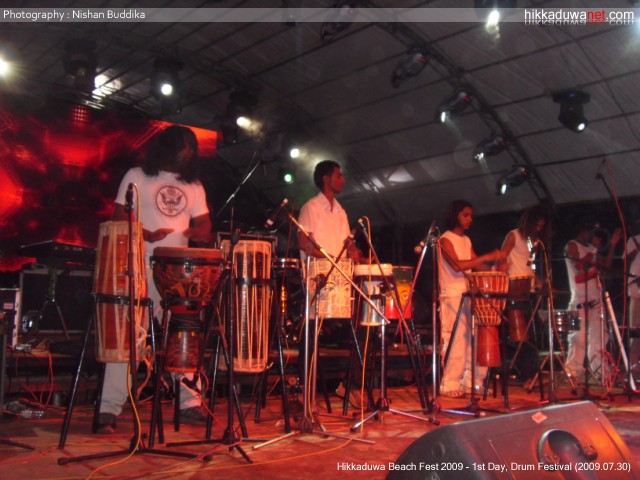
New Pictures of Hikka Fest 2009

I had already mentioned in a blog article මොකක්ද මේ Hikka Fest? I've never been to Hikka but I wish to go there in next year. I got this URL from my friend, http://www.hikkaduwanet.com. Fortunately they enable IndexIgnore in Apache. I thought this would be a great pictures to share with you.

Day 1 - Drum Festival 30th July, 2009


more photos of Day 1 --> http://www.hikkaduwanet.com/music_party/hikka_fest09/gallery/first_night/portfolio/foto1/

Day 2 - Beach Rave 31st July , 2009


more photos of Day 2 --> http://www.hikkaduwanet.com/music_party/hikka_fest09/gallery/second_night/portfolio/foto1/

Themed Parties 1st to 2nd August 2009


more photos of Themed Parties --> http://www.hikkaduwanet.com/music_party/hikka_fest09/gallery/themed_parties/portfolio/foto1/

Sports and Events 30th July to 2nd August 2009


more photos of Sports N Events --> http://www.hikkaduwanet.com/music_party/hikka_fest09/gallery/sports_events/portfolio/foto1/

source http://www.hikkaduwanet.com